
Updated: May 2026
At a Glance
Choosing the wrong knowledge management platform does not just waste budget. It actively makes agents’ jobs harder. Research shows 54% of knowledge workers say their KMS makes it more difficult to find the information they need, not less. The right platform for your contact center depends on your operational environment, your tech stack, and the specific workflows agents use every day. This comparison covers seven essential features, seven critical compatibility factors, and a head-to-head rating of 12 leading platforms organized by organization size to help you make a well-matched selection.
The Hidden Cost of Choosing the Wrong KMS
A staggering 69% of knowledge workers report wasting time searching for the information they need to do their jobs well and deliver a positive customer experience. Knowledge management software should solve this problem, but organizations frequently discover that a poorly chosen KMS creates new obstacles rather than removing existing ones. In fact, 54% of those surveyed reported that their knowledge tools were actually making it harder to find the information needed to do their jobs.
Choosing the right platform starts with a thorough assessment.
→ Related: Conduct a Call Center Knowledge Management Assessment outlines the six-step process for evaluating your current KMS state before selecting or implementing a new platform.
4 Reasons to Complete a Knowledge Management Assessment
A well-matched knowledge management platform delivers measurable impact across your entire operation. Here is what the right tool can do:
1. Improve Decision-Making and Productivity
When employees can access and share knowledge quickly, decisions get made based on the best available information. This drives faster, more confident choices that improve customer satisfaction, first call resolution, and NPS, with a direct positive impact on your bottom line.
2. Increase Innovation
A KMS that encourages the sharing of ideas and best practices cultivates a culture of collaboration and innovation. That environment produces new products, services, and processes that give your organization a competitive edge.
3. Reduce Costs
An effective KMS reduces the time employees spend searching for critical information, freeing capacity for higher-value work. The result is measurable improvement in productivity alongside lower labor and operational costs.
4. Improve Employee Satisfaction
When employees have the knowledge they need to do their jobs effectively, they feel empowered and in control of their performance. This drives engagement, motivation, and satisfaction.
7 Essential Knowledge Base Platform Features
Not all platforms are built the same. Your knowledge management team deserves a system that delivers on the features that matter most. Here are the seven capabilities your KMS must have:
1. Comprehensive and Customizable Reporting and Engagement Analytics
Robust reporting gives you a clear view of content engagement and top employee search queries. The right analytics help you identify knowledge gaps, prioritize improvements, and make data-driven content decisions.
2. Deep Search Functionality
Agents need to find answers fast. A strong search capability supports keyword search, advanced filters, and relevant suggestions, and should be able to identify keywords across all file types including PDFs and videos.
3. Version Control and Audit Trail
The ability to track changes, maintain version history, and identify who made modifications ensures content accuracy, accountability, and compliance. It also streamlines your knowledge governance processes and saves significant time in managing content over time.
→ Related: Knowledge Governance: A Plan to Knowledge Management Success explains the governance structure your KMS needs to stay accurate, compliant, and useful as your operation scales.
4. Rich Publishing
Your team should be able to update articles and workflows quickly and easily in a fully customizable format without needing to write or update code.
5. Collaboration and Feedback
Built-in collaboration tools allow agents and subject matter experts to share feedback, suggest improvements, and discuss enhancements that raise the overall quality of your knowledge articles.
6. Integration With Contact Center Systems
Seamless integration with customer relationship management (CRM) software, ticketing systems, and other contact center tools empowers agents to access relevant knowledge during live customer interactions and deliver accurate, consistent information every time.
7. Intuitive User Interface
A user-friendly interface should enable easy navigation, thoughtful information design, and an experience that employees actually want to use with every interaction.
7 Critical Knowledge Management System Compatibilities
Beyond features, evaluate each platform against these seven compatibility factors before making your selection:
- Integrability with your organizational and IT systems and requirements
- Ease of use
- Setup simplicity
- Ease of administration
- Caliber of system support
- Quality of partnership
- Confidence in the product’s direction
12 Best Knowledge Management Platforms Compared and Rated
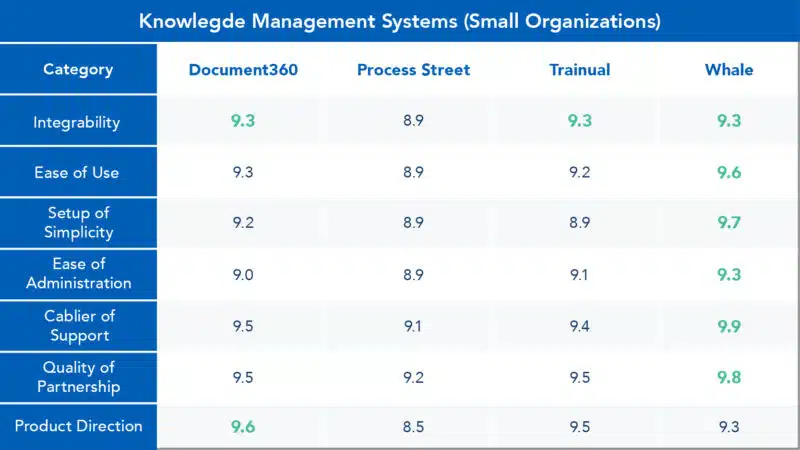
Using feedback from real system users, Insite researched, rated, and compared 12 of the market’s leading knowledge management platforms across the seven critical compatibilities above. Results are organized into three categories based on performance within small, midsized, and enterprise-sized organizations.
- Document360, Process Street, Trainual, and Whale
- Bloomfire, ProcedureFlow, Shelf, and Tettra
- livepro, Panviva, Serviceware, and Yext
→ Related: The Optimal Team for Your Knowledge Management System Build covers the roles and responsibilities required to build and maintain a KMS that actually performs once the platform is selected.
Ready to Select the Right Knowledge Management Platform?
Insite’s knowledge management consultants are here to help you navigate platform selection, system build, KMS training, and more. Schedule a consultation to get started.